Run the resident side

Resident work, ready to run itself.

Resident ops should not wait on inboxes, spreadsheets, or manual follow-ups. Unify your workflows, set the rules, and give trained AI agents the context to get more of the workdone.

Schedule A Demo
Request details UI
Active work orders UI
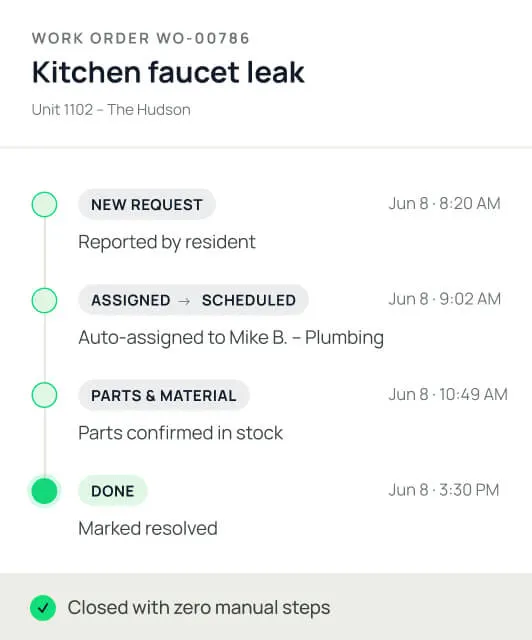
Work order progress timeline

A front door for residents.

An operating system for your team.

Residents get one place to pay rent, request maintenance, book amenities, and stay updated. Your team and AI agents work the queue behind it, so the right work lands with the right person without the inbox chase.

DashQ resident home dashboard for paying rent, requesting maintenance, booking amenities, and viewing notices, layered over the team's active work-orders queue

DashQ is making our leasing process easier, quicker and more secure.

Catherine Miron
Director of Marketing
Maintenance

Maintenance, from request to resolution.

One connected workflow for every service request, work order, and field update. Less chasing. Cleaner handoffs. A clearer view of the work getting done.

01

Capture the issue fully.

Right arrow
Residents submit the issue with photos, access notes, and preferred appointment time. Your team walks in with the context, not the guessing game.
02

Keep the work moving.

Right arrow
Every request lands in one queue, with priority, status, property, and owner easy to see. One place to route and assign the work, schedule the next step, and spot what’s sitting too long.
DashQ Maintenance pipeline showing an active work-orders queue, with each request's category, description, priority, and assigned owner in one view for routing and scheduling
03

Document the fix.

Right arrow
Technicians capture notes, time, safety checks, and completion photos from the field. Residents see the status. Managers keep the record.
Technician work-order view for a blocked sink, showing field work notes, completion photos, and action buttons to pause, send a quote, or complete the job
04

Equip the field team.

Right arrow
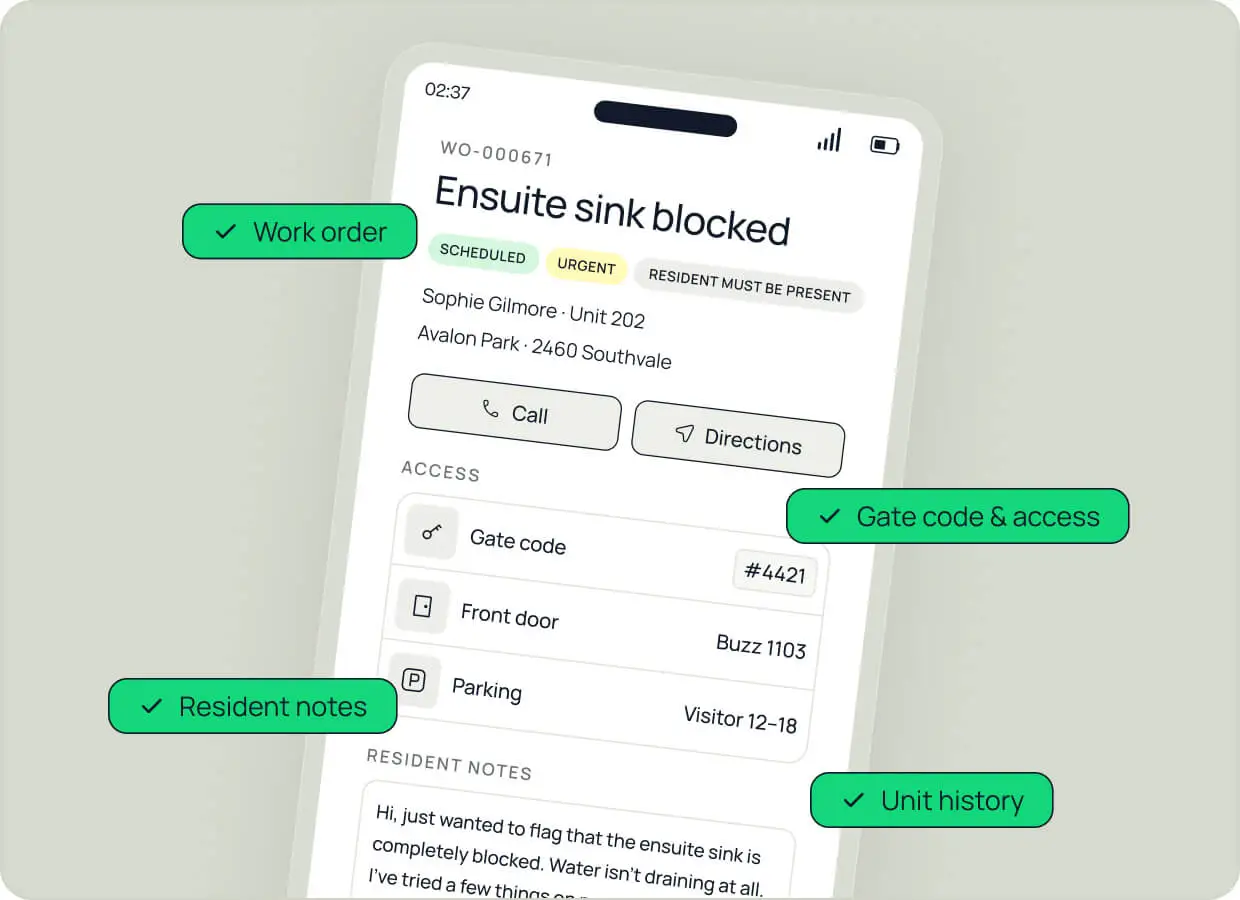
Work order, unit history, gate codes, and resident notes load on the mobile view before the truck rolls. Less drive-time, fewer return visits.
mobile work-order screen for a technician showing the job details, resident contact, gate codes and access info, and resident notes loaded before the visit.
RENT COLLECTION

Rent payments, built for real households.

Simpler for residents to pay and split rent. More control for the teams collecting it.
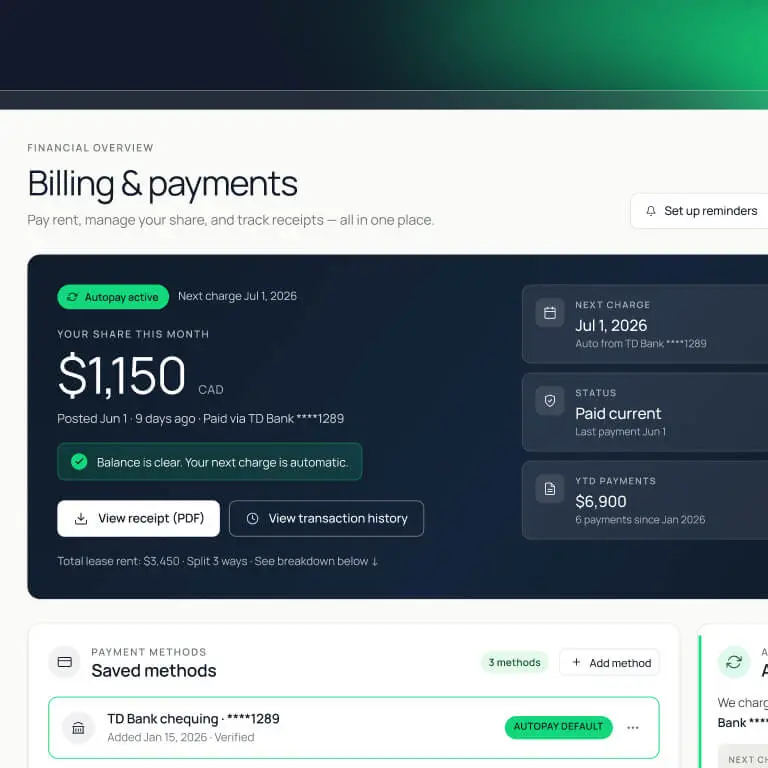
DashQ resident Billing & payments screen showing this month's rent share, autopay status, next charge, and saved payment methods, with options to view receipts and transaction history

Make rent easy to pay.

Bank, debit, or credit card payments by property. Residents see their balance, pay rent, set up auto-pay, and get receipts — without calling the office.

DashQ split-rent view showing rent divided across three co-tenants, each with their own monthly share, payment status, and linked bank account.

Split the rent without the mess.

Three roommates. Three bank accounts. One ledger. Each co-tenant manages their own share from their own account. Fixed amount or percentages.

DashQ property payment setup for Briarpoint Lofts, configuring merchant accounts and accepted payment methods — bank, credit, and debit — per property

Let accounting close cleaner.

Set payment methods by property, collect payments in the right flow, and connect every transaction to the right resident, unit, and charge code.

Run more doors with the same team.
Schedule A Demo
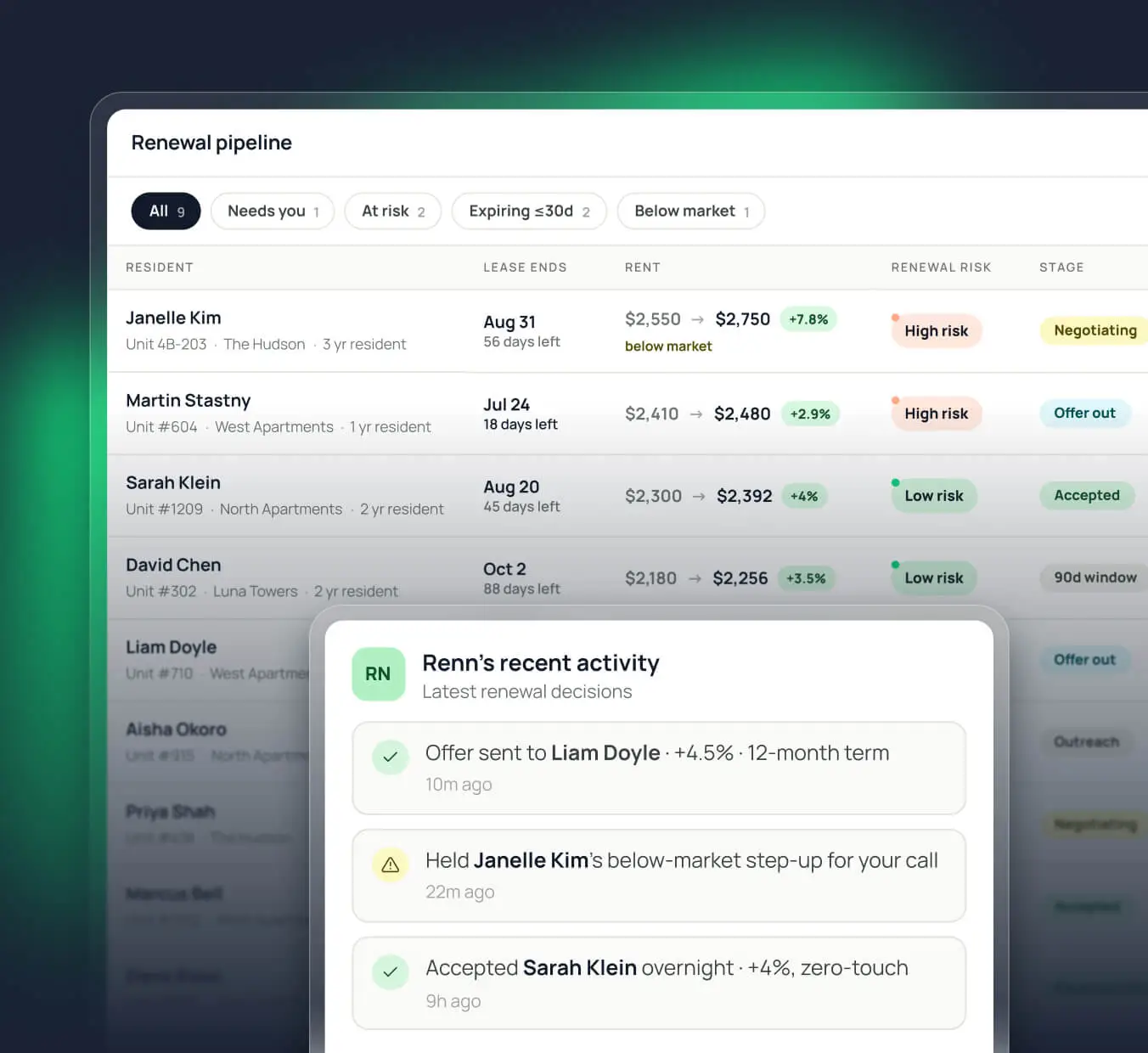
DashQ Renewal pipeline showing expiring leases with each resident's current and proposed rent, renewal risk, and stage, plus a recent-activity panel logging the AI agent Renn's renewal decisions
RENEWALS

Stop losing rent increases to the spreadsheet.

See every expiring lease in one pipeline. AI handles the standard work, your team steps in for the exceptions, and the new rent syncs back to your PMS.

RESIDENT PORTAL

Resident experience. The way it should be.

The everyday moments that make a community feel like home. One place for your residents to stay informed, get answers, and book what they need, without the work getting lost in scattered inboxes.

ANNOUNCEMENTS

Keep the residents in the know.

Building notices, updates, and documents live in the portal, with notifications sent by resident preferences. No buried emails. Fewer calls to the office.
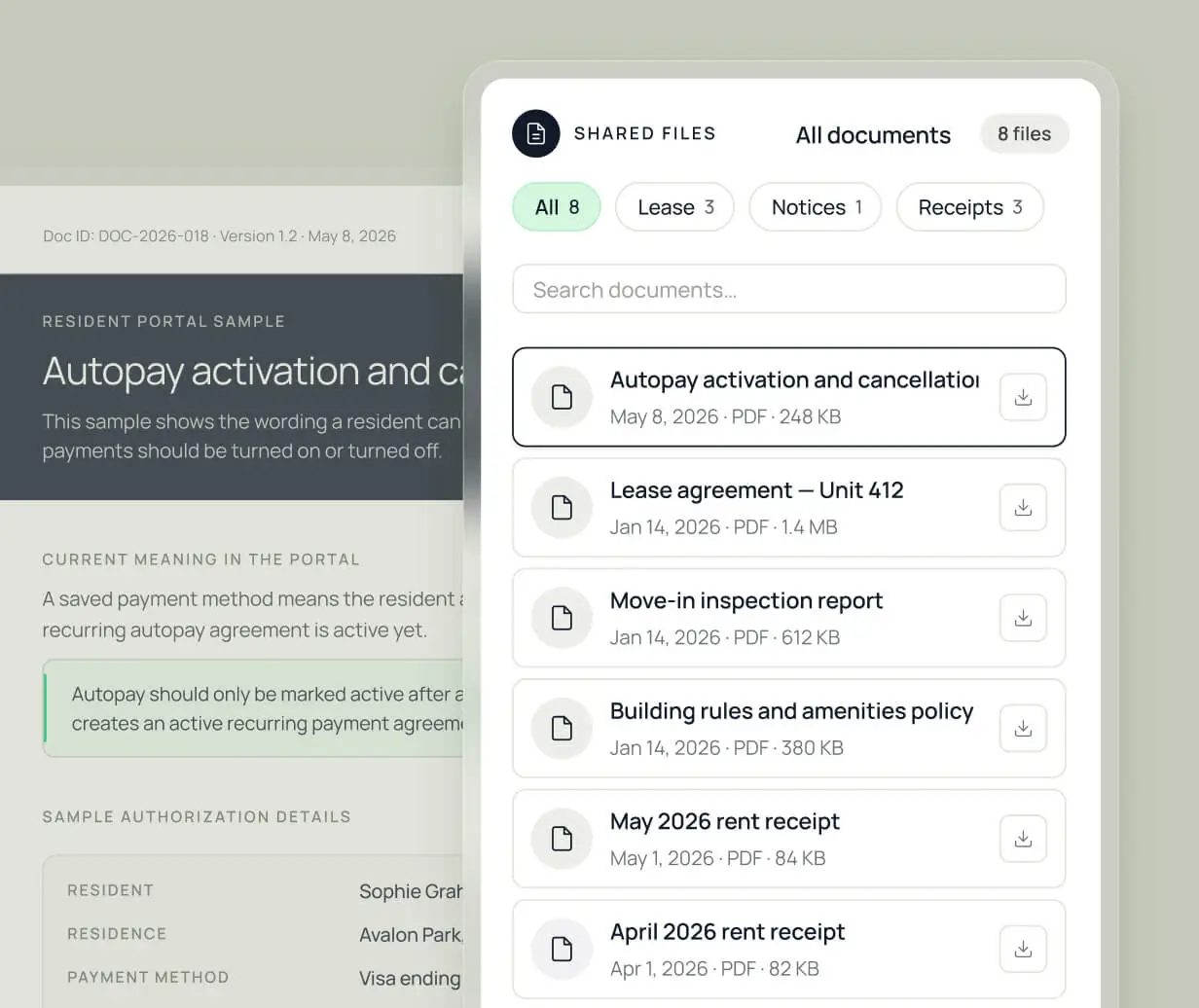
DashQ resident portal document library showing shared files filtered by leases, notices, and receipts, with a document preview open alongside the searchable list
COMMUNICATIONS

Send every message to the right desk.

Resident messages routed to the right team, with the topic, attachments, and resident record already connected. Residents get afaster responses. Teams know what to do next.
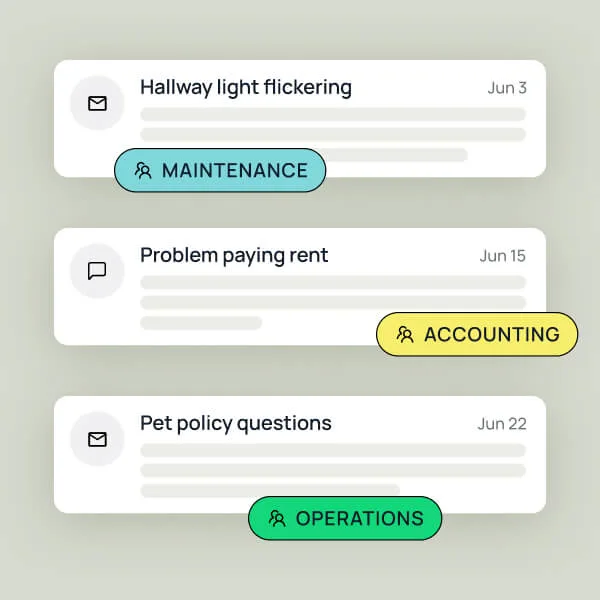
DashQ communications view showing resident messages auto-routed to the right team, each tagged by topic — maintenance, accounting, or operations.
DashQ resident amenity booking view showing bookable spaces like a meeting room and fitness studio, with a 'Request a hold' form for date, time, guests, and event type
AMENITIES

Make amenities easy to book.

Residents book amenities from the portal. Your team controls the rules behind every booking, from availability and approvals to deposits, inspections, and releases.

INTEGRATIONS

Your resident stack, perfectly connected.

Resident work connected to the rest of your tech stack. No duplicate records, no side portal to babysit, and no back-office cleanup after every resident action.

Green check icon
Lease details, resident records, documents, balances, and ledger history are read from your PMS.
Green check icon
Rent payments flow through your payment provider and post back to the right unit ledger.
Green check icon
Messages, photos, notices, and updates stay connected to the resident record, not scattered across tools.
DashQ resident-ops intelligence view showing AI resolution and conversation-volume charts behind a knowledge-base article, with an AI recommendation to expand the pet deposit policy based on questions the team had to answer
INTELLIGENCE

Resident ops that learns as it runs.

Every payment, maintenance request, message, booking, and notice adds operating context. See the patterns, sharpen the workflow, and give AI the foundation to manage more resident work over time.

One operating layer for the work after the lease is signed.

Schedule A Demo