
Introducing DashQ Storefronts
November 11, 2026
DashQ Storefronts replaces your community website with a branded site where renters can find a home and complete their lease. DashQ designs, builds and maintains it for you, connecting the homes renters see to your inventory, tour calendars and leasing workflows.
Many community websites already display inventory, offer tour booking and accept applications. The experience can still break when availability is out of date, appointments conflict with the team’s calendar or the Apply button sends renters to an unfamiliar portal.
We built Storefronts to help turn more of your website demand into signed leases. Renters can move through those steps in one familiar place, with less coordination from your leasing team.
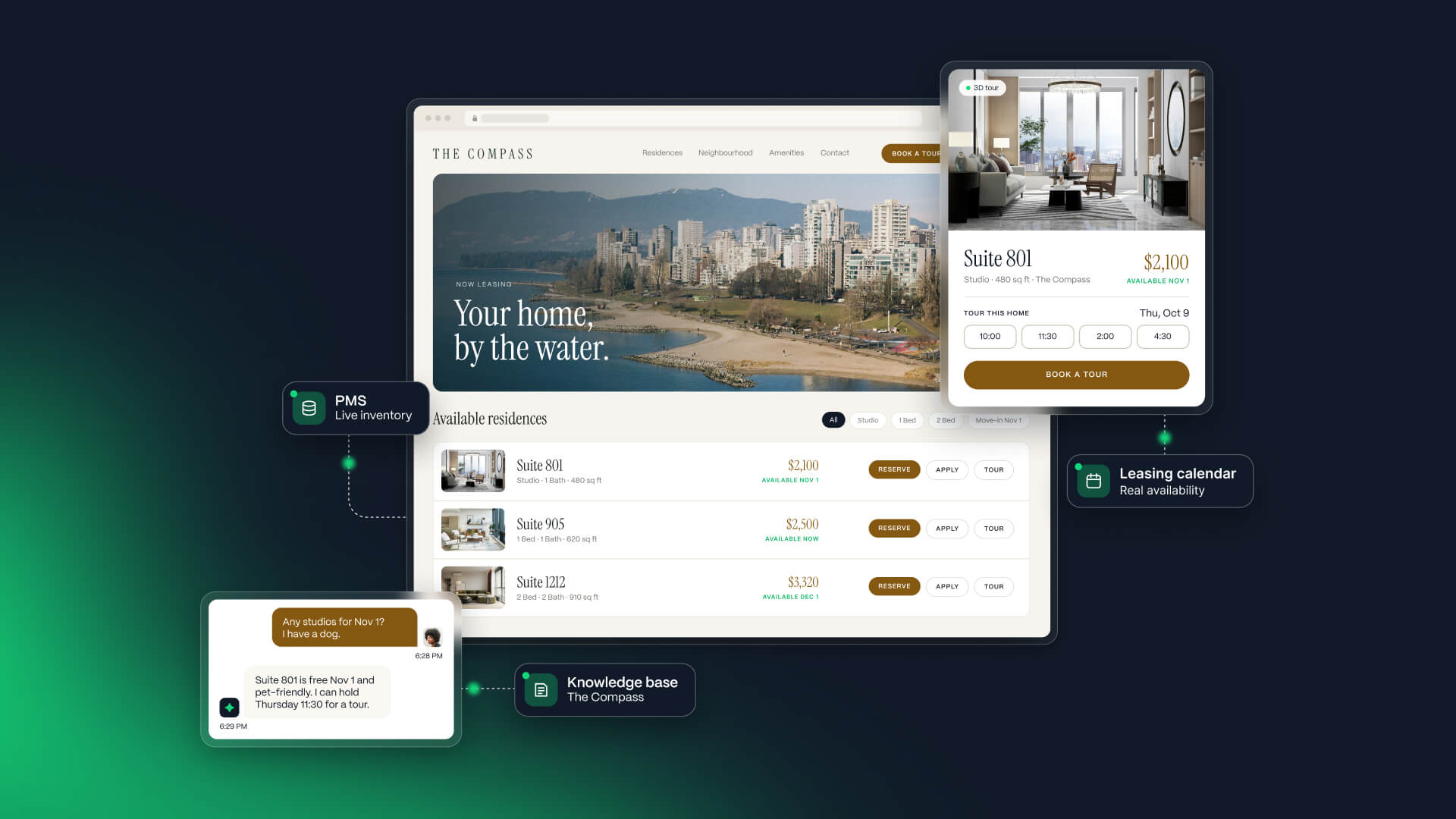
Help renters choose from available homes
Availability, pricing and promotions sync from your property management system (PMS), connecting the homes on the site to the inventory you’re leasing. Renters can narrow their options with filters and side-by-side comparison, explore floor plans, photos and virtual tours, and see the full cost, including applicable fees, parking and deposits.
AVA, your AI leasing agent, answers questions about the community right on the page using your community’s knowledge base, helping renters get the information they need to take the next step.
Bring tour booking, applications and signing into your website
Storefronts brings DashQ Convert and Checkout into the community website, so renters can continue with the home they’ve chosen.
- Book a tour your team can deliver. Renters choose from your team’s real calendar availability. Bookings are routed to the right representative, with confirmations, reminders and rescheduling handled in DashQ.
- Apply and track progress in a familiar place. Renters complete applications and identity, income and background checks, add co-applicants or guarantors, and return to the community website to see their progress. Applications follow your configured approval rules, with exceptions routed to your team.
- Complete the lease online. Renters select extras such as parking or storage, pay required deposits and sign electronically. Applicable charges and lease addenda are applied automatically, and completed lease details go back to your PMS.
For communities using DashQ Serve, the experience continues after signing. The move-in checklist appears on the Storefront, and renters can return there to log into their resident portal.
Storefronts also supports Google Tag Manager and Meta Pixel for campaign measurement on each community’s website. Within DashQ, source information follows renters through tours, applications and signed leases, helping marketers see which channels turn demand into leases.
Each Storefront is configured around your brand, leasing requirements and the DashQ products you use.

Join our community and get multifamily tips & trends delivered to your inbox.